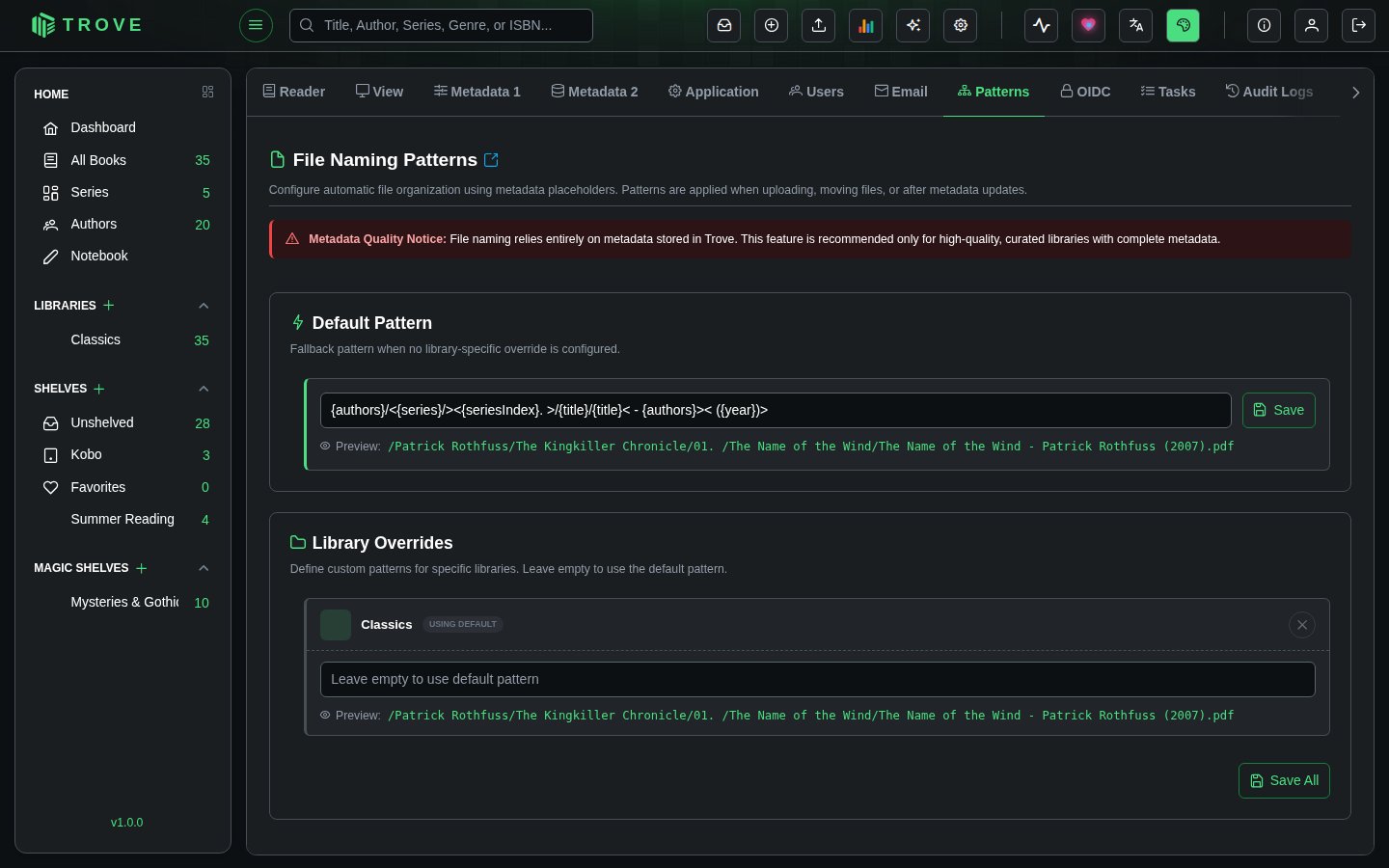
File naming patterns
Configure automatic file organization using metadata placeholders. Patterns are applied when uploading books, finalizing Bookdrop imports, moving files between libraries, and (optionally) after metadata updates.
How Patterns Work
Patterns are text templates with placeholders in curly braces. When a file is processed, Trove replaces each placeholder with the book's actual metadata and renames/moves the file accordingly.
{authors}/{series}/{seriesIndex} - {title}Produces:
J.K. Rowling/Harry Potter/01 - Harry Potter and the Sorcerer's Stone.epubThe file extension is always added automatically.
Available Placeholders
| Placeholder | Description | Example |
|---|---|---|
{title} | Book title | The Hobbit |
{subtitle} | Book subtitle | There and Back Again |
{authors} | Author name(s) | J.R.R. Tolkien |
{year} | Publication year | 1937 |
{series} | Series name | Middle-earth |
{seriesIndex} | Series position, zero-padded | 01 |
{language} | Language code | en |
{publisher} | Publisher name | Allen & Unwin |
{isbn} | ISBN (prefers ISBN-13) | 9780547928227 |
{currentFilename} | Original filename with extension | hobbit_original.epub |
Modifiers
Add a modifier after a colon to change how a value is written:
| Modifier | Gives | Example with authors "Arthur Conan Doyle, Joseph Bell" |
|---|---|---|
{authors:first} | Only the first of several values | Arthur Conan Doyle |
{authors:sort} | The first value, surname first | Doyle, Arthur Conan |
{authors:initial} | One capital letter (for authors, of the first author's surname) | D |
{title:upper}, {title:lower} | Upper or lower case | A STUDY IN SCARLET |
So {authors:initial}/{authors:sort}/{title} gives D/Doyle, Arthur Conan/A Study in Scarlet.epub, the layout many large libraries use. {extension} is also available, though the extension is added for you anyway.
Folder Structures
Use forward slashes to create nested folder structures:
{authors}/{series}/{seriesIndex} - {title}
→ J.K. Rowling/Harry Potter/01 - Harry Potter and the Sorcerer's Stone.epub
Trailing slash keeps the original filename:
{title}/
→ Harry Potter and the Sorcerer's Stone/harry1_original.epub
Leading slash creates an absolute path from the library root:
/{authors}/{title}
→ /J.K. Rowling/Harry Potter and the Sorcerer's Stone.epub
Optional Blocks
Wrap parts of a pattern in angle brackets (<...>) to make them conditional. If any placeholder inside the block has no value, the entire block is removed.
<{seriesIndex} - >{title}- With series index:
01 - Dune.epub - Without series index:
Dune.epub
This is essential for metadata that may be missing, like series, subtitle, or ISBN.
Otherwise
Put a | inside a block to give an alternative for when the first part can't be filled: <{series}|Standalone>/{title} files books without a series under Standalone.
Examples
Subtitle block:
{title}<: {subtitle}>- With subtitle:
Project Hail Mary: A Novel.epub - Without:
Project Hail Mary.epub
Full series path with fallbacks:
{authors}/<{series}/><{seriesIndex}. >{title}- Full metadata:
Andy Weir/The Martian Series/02. Project Hail Mary.epub - No series:
Andy Weir/Project Hail Mary.epub
Decorative brackets:
<[{series}] >{title} - {authors}- With series:
[Harry Potter] Chamber of Secrets - J.K. Rowling.epub - Without:
Chamber of Secrets - J.K. Rowling.epub
Worked Examples
With Complete Metadata
Sample book: Harry Potter and the Sorcerer's Stone by J.K. Rowling, Series: Harry Potter #1, Year: 1997, Original file: harry1_original.epub
| Pattern | Output |
|---|---|
{authors} - {title} | J.K. Rowling - Harry Potter and the Sorcerer's Stone.epub |
{authors}/{series}/{seriesIndex} - {title} | J.K. Rowling/Harry Potter/01 - Harry Potter and the Sorcerer's Stone.epub |
{title}/ | Harry Potter and the Sorcerer's Stone/harry1_original.epub |
{authors}/{series}/{currentFilename} | J.K. Rowling/Harry Potter/harry1_original.epub |
/{authors}/{title} | /J.K. Rowling/Harry Potter and the Sorcerer's Stone.epub |
With Missing Metadata
Sample book: Project Hail Mary by Andy Weir, Year: 2021, no series, no subtitle. Original file: project_hail_mary_final.epub
| Pattern | Output | What happened |
|---|---|---|
{authors}/<{series}/><{seriesIndex}. >{title}< ({year})> | Andy Weir/Project Hail Mary (2021).epub | Series and index blocks removed, year block kept |
<{seriesIndex}. >{title}< - {authors}> | Project Hail Mary - Andy Weir.epub | Index block removed |
<[{series}] >{title} - {authors} | Project Hail Mary - Andy Weir.epub | Brackets and series removed entirely |
{title}<: {subtitle}> | Project Hail Mary.epub | Subtitle block removed |
Safe file names
Whatever the metadata says, the names Trove creates are safe on every common filesystem, including SMB shares and Windows: the characters \ / : * ? " < > | are removed from values, names don't end in a space or a full stop, reserved Windows names such as CON, PRN or LPT1 are avoided, and very long titles are shortened. The same applies to {currentFilename}. Renaming a file only in upper or lower case works on case-insensitive shares too.
Configuration
Default Pattern
The default pattern applies to all libraries unless overridden. Set it in the Default File Naming Pattern section, then click Save. A live preview shows what the output would look like.
If no pattern is configured at all, files keep their original filename.
Library-Specific Overrides
Each library can have its own pattern. Leave a library's pattern empty to inherit the default. Click Clear to remove an override.
Some useful per-library patterns:
| Library Type | Pattern |
|---|---|
| Comics/Manga | {series}/{seriesIndex} - {title} |
| Academic | {year}/{authors} - {title} |
| Audiobooks | {authors}/{title}/ |
| Fiction | {authors}/<{series}/><{seriesIndex}. >{title} |
| Multi-language | {language}/{authors}/{title} |
When Patterns Are Applied
- Uploads to a library
- Bookdrop imports when finalizing files into a library
- File moves between libraries or subfolders
- Metadata updates, if the "Auto-Move Files on Metadata Update" setting is enabled for that library